
Self-guided product walkthrough
About 3 minutes · No meeting requiredSee how AdjusterDesk keeps one claim moving from intake to next action.
Move through the six steps below at your own pace. Start with the core claim workflow, then see how a public-adjusting firm can extend the same connected system into new opportunities.
Event and weather information is for operational awareness only. Firms must verify information and follow applicable licensing, solicitation, privacy, and safety requirements.
60 days free · No credit card required · Plans from $149/month. After signup, a fictional training claim opens automatically—no client data or AI credits required.
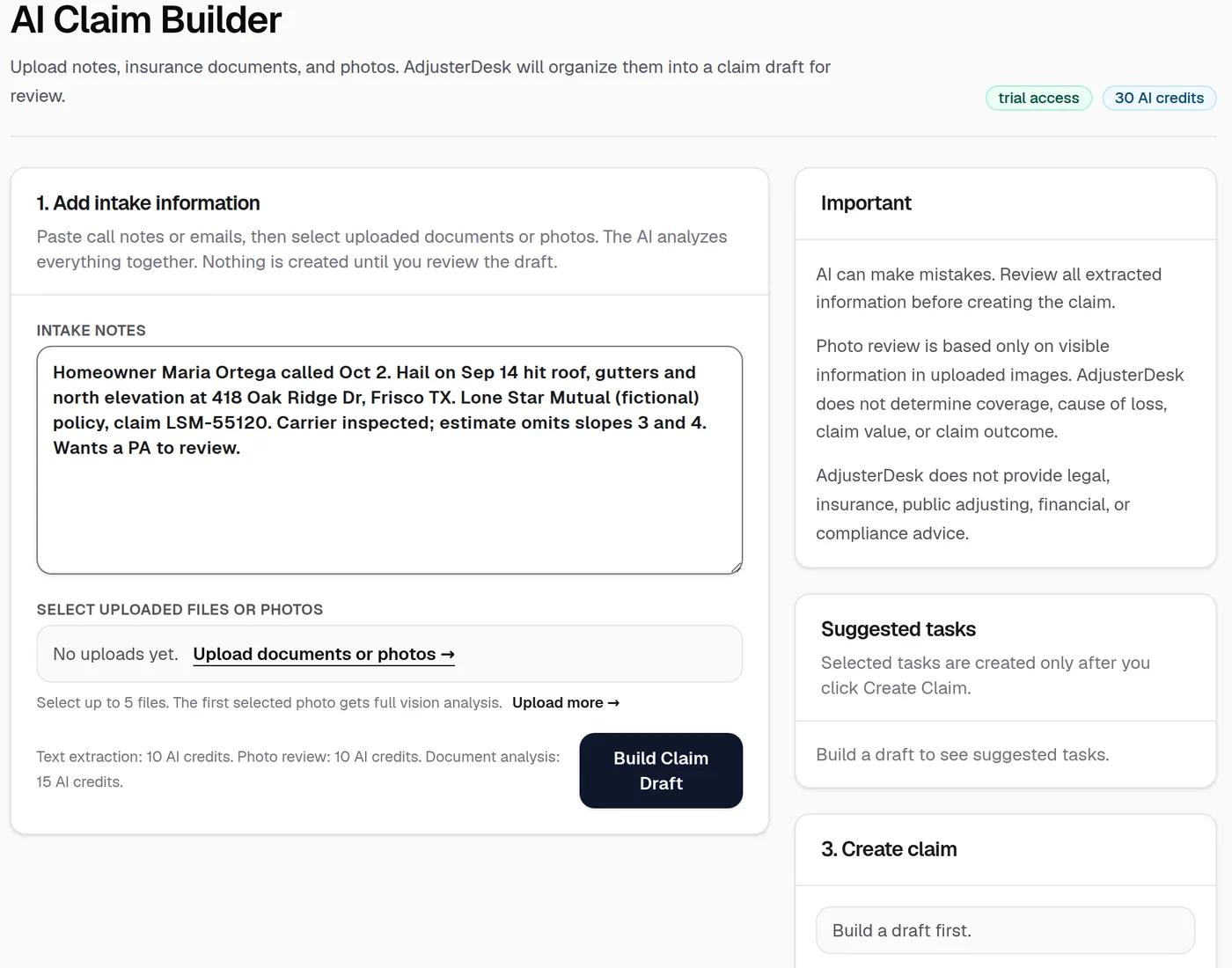
01 · Intake Agent
Turn scattered lead information into a structured claim draft.
Paste call notes, review uploaded material, and organize client, property, carrier, loss, and missing-information details before anyone creates the claim.
What the team does next
Step 1 of 6
Explore without a sales call
Ready to organize your first claim?
Create your workspace, explore the fictional sample claim, then follow the built-in setup guide at your own pace. Founding firms can also request founder-led help setting up their first workflow.
60 days free · No credit card required · Plans from $149/month
Save the walkthrough
Send the tour to your work inbox.
You will get the walkthrough link now and one practical follow-up. No meeting or client data is required.